How do I compare revenue by bike category?
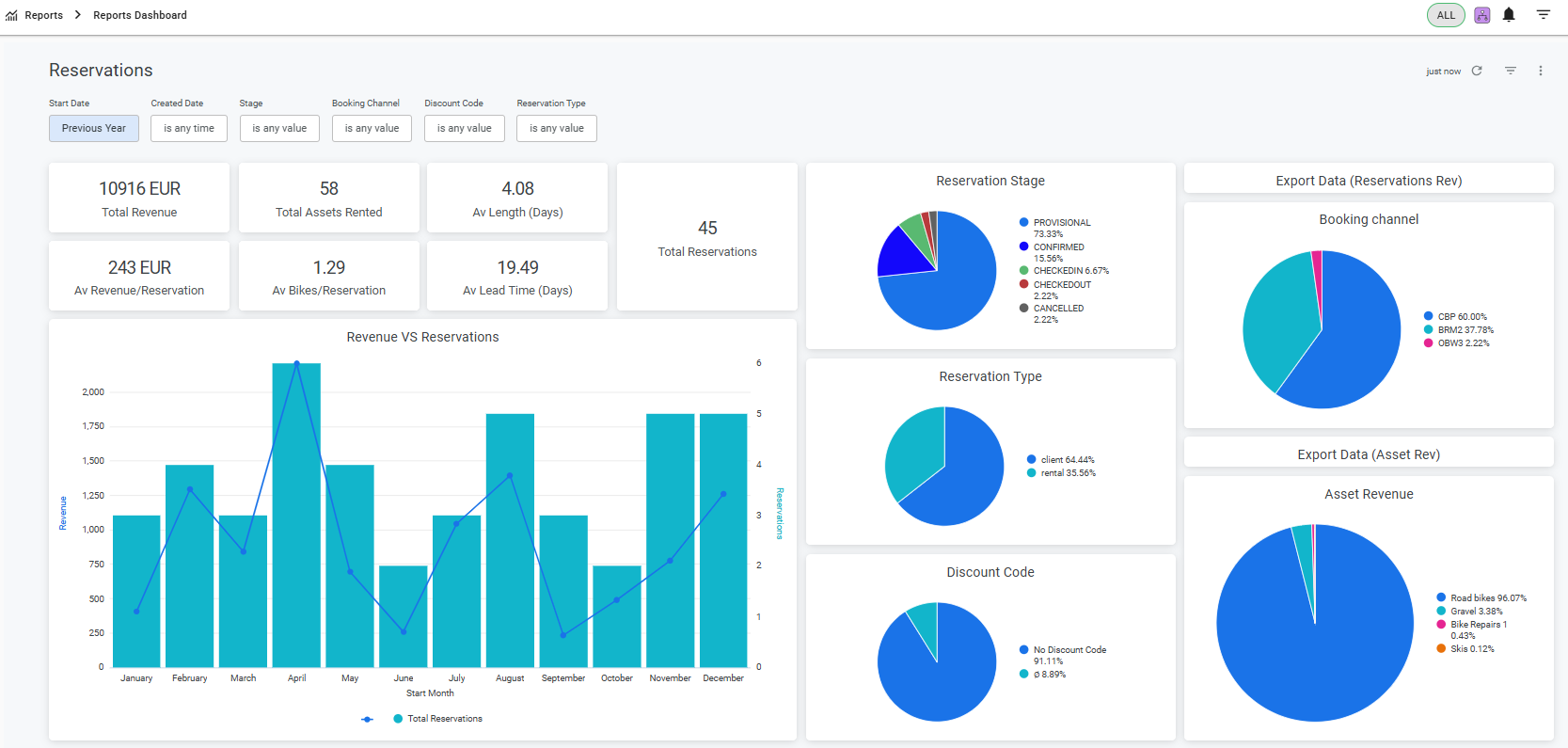
To compare revenue by bike category, open Reports and the Reports Dashboard. Use the Asset Revenue chart to compare categories, then explore product families, product lines or individual bikes. Apply the dates and filters you need and click Update. This chart measures revenue; it is not a physical stock-movement report.
Location: Available via the Reports section in the BRM back office
example:
Access & Security
A Reports Dashboard card is visible in the Reports section of the back office

Clicking the card opens the embedded Looker dashboard, which loads directly within the BRM interface
Report data is restricted to the logged-in store. Multi-store view will be available as a premium feature.
Dashboard Overview
This dashboard gives you insights into your reservation activity and revenue performance. Each chart and metric is designed to help you take action and make informed decisions.
Filters
*Filter selection is applied by clicking the Update button. The dashboard does not auto-refresh on selection.
*All filters update every chart on the page when applied.
Dashboard Metrics & Value
Charts & Graphs
Additional Functionalities
Data Validation
The dashboard is fully aligned with your BRM data and supports consistent reporting:
When "Exclude Cancelled" is enabled, revenue and booking totals match the old “Rentals per Month” report
All calculation logic is consistent with other BRM reports and tools
Common questions & Troubleshooting
Authentication expiry / “Connection not authorised”
The embedded Reservations Dashboard is powered by our reporting service and securely connected to the main reporting platform on a session basis.
For security reasons,such as preventing data exposure if a device is left unattended, these sessions expire automatically after a period of inactivity. When this happens, you may see a message such as “Connection not authorised.”
How to resolve it
Refresh the browser page
If the issue persists, log out of BRM and log back in
This will re-establish the session and restore access to the dashboard.
Dashboard not loading in Safari
Some customers using Safari may experience issues accessing the embedded dashboard, even though it works correctly in other browsers.
This is typically caused by Safari’s cross-site tracking prevention, which can block the secure connection required to display the embedded reports.
How to fix it (Safari)
Open Safari → Settings (or Preferences)
Go to the Privacy tab
Disable the option “Prevent cross-site tracking”
Refresh the BRM page or log out and back in
Was this article helpful?
That’s Great!
Thank you for your feedback
Sorry! We couldn't be helpful
Thank you for your feedback
Feedback sent
We appreciate your effort and will try to fix the article