What this does
Each service offering controls how customers receive it, using two independent toggles — Collection (let the customer collect in store) and Delivery (offer to deliver to the customer's address). The combination of the two gives you four outcomes at checkout:
| Collection | Delivery | What the customer gets |
|---|---|---|
| On | Off | Pick-up only — collect in store |
| Off | On | Delivery only |
| On | On | Both — the customer chooses at checkout |
| Off | Off | Neither — the collection step is skipped |
Checkout automatically shows only the option(s) you've enabled for that offering.
On the Customer Booking Page this appears to the customer as the Collection method step.
How to set it up
- Go to Settings and open Service Offering Management
- Pick the service (e.g. Rental) and click Manage.
- Click Edit on the offering you want to configure.
- Set the Collection toggle on or off. When on, choose the Locations where customers can collect, and optionally a Default location.
- Set the Delivery toggle on or off.
- Click Save changes.
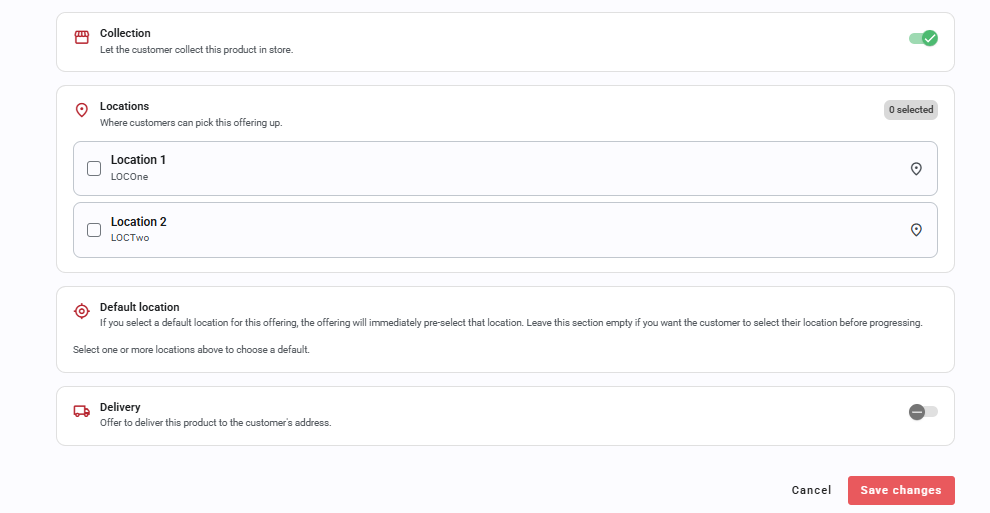
Each offering's current setup is summarised on the offerings list with Collection and Delivery status chips.

What happened to my existing delivery settings?
Nothing changes unexpectedly — existing offerings were migrated for you: those that had delivery on keep delivery enabled (Both), and those with delivery off become pick-up only.
Delivery address & notes
Your global Show Delivery Address and Show Delivery Notes settings are unchanged and stay on the Online Delivery settings page, regardless of how any individual offering is configured.
FAQ
Does this affect back-office bookings?
No — this controls what customers see on the Customer Booking Page. Back-office reservation creation is unaffected.


Was this article helpful?
That’s Great!
Thank you for your feedback
Sorry! We couldn't be helpful
Thank you for your feedback
Feedback sent
We appreciate your effort and will try to fix the article