What this does
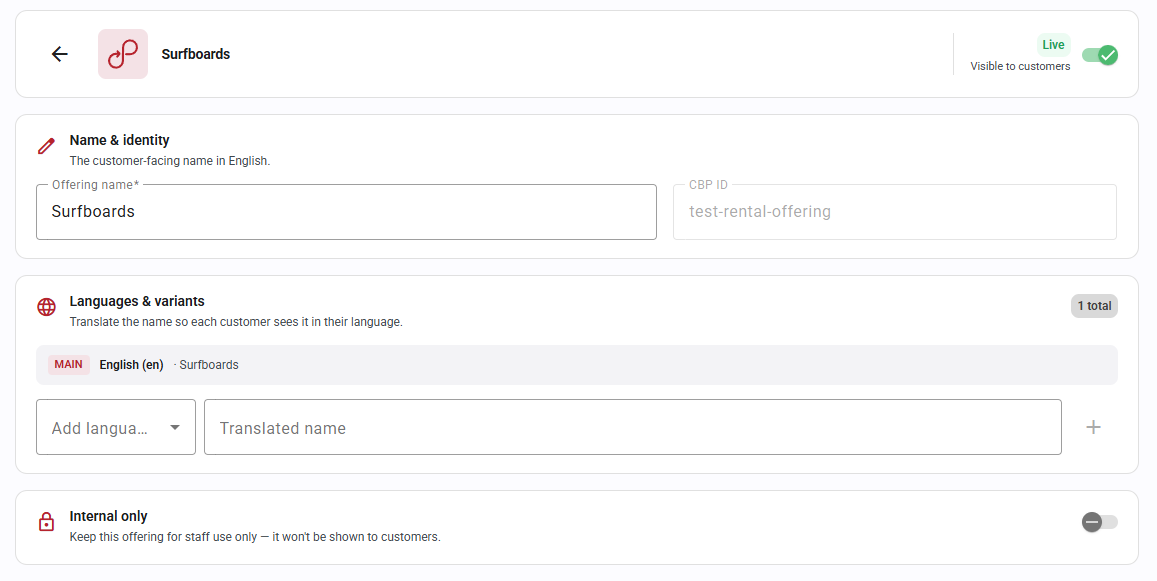
The Internal only toggle keeps a service offering for staff use only — it stays available to your team in the back office but is hidden from customers on the Customer Booking Page.
Use it for:
- Staff-only or internal products
- Special arrangements you don't want bookable online
- Offerings you're still setting up and aren't ready to publish
How to set it up
- Go to Settings → Service Offering Management (under General).
- Pick the service (e.g. Rental) and click Manage.
- Click Edit on the offering you want to hide.
- Turn on the Internal only toggle — “Keep this offering for staff use only — it won't be shown to customers.”
- Click Save changes.
Once on, the offering stays fully available for back-office reservation creation by your team and no longer appears on the Customer Booking Page. The offering's visibility status is shown at the top of its edit screen (Visible to customers).
FAQ
Can I still book an internal-only offering for a customer?
Yes — it's available as normal when you create a reservation in the back office. It's only hidden from the customer-facing booking page.
Can I turn it back on for customers later?
Yes. Switch the toggle off and the offering becomes bookable on the CBP again.
Does this delete or deactivate the offering?
No. The offering stays active and fully functional internally; this only controls its visibility to customers.
See Also
Overview of Service Offerings

Was this article helpful?
That’s Great!
Thank you for your feedback
Sorry! We couldn't be helpful
Thank you for your feedback
Feedback sent
We appreciate your effort and will try to fix the article