Before you start
Payment links work for any booking at a store with Stripe connected. If Stripe payment link isn't in the payment dialog's Method list, contact BRM support.
When a booking can't have a link, the method shows greyed out with one of these reasons:
| You see | What to do |
|---|---|
| Connect Stripe in Settings to take payments by link. | Connect your Stripe account in Settings. |
| Stripe isn't fully set up, so payments wouldn't reach the booking. Repair the Stripe webhooks in Settings. | Repair the Stripe webhooks in Settings. |
| This booking is cancelled. | Links can't be made for cancelled bookings. |
| Nothing is outstanding on this booking. | The booking is paid in full. |
How to create and send a payment link
- Open the booking and click Add transaction.
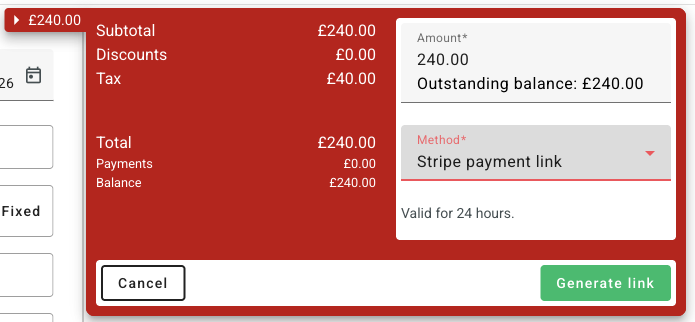
- In Method, choose Stripe payment link. It sits just under Stripe.
- Check the Amount. It starts at the outstanding balance, shown under the field. You can lower it to take part of the balance, such as a deposit. It must be more than zero and no more than the balance.
- Click Generate link. The link works for 24 hours.
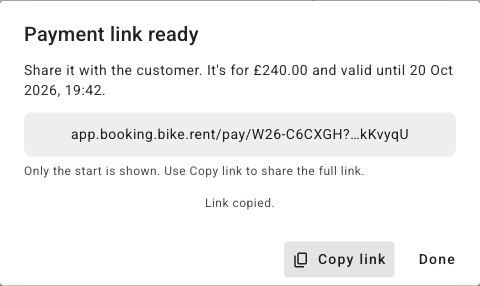
- In Payment link ready, click Copy link, then click Done.
- Paste the link into an email, text or WhatsApp message to your customer.
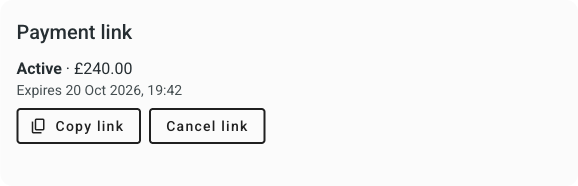
- Copy it again later with Copy link on the payment link card in the booking's Transactions tab, while the link is active.
- One link per booking. Making a new link cancels the current one, and the dialog warns you: "Generating a new link cancels the current one."
- Stop a link before it's paid with Cancel link on the card. It takes effect straight away, with no confirmation.
- The back office shows only part of the link, so it stays out of screen recordings. Copy link always copies it in full.
What your customer sees
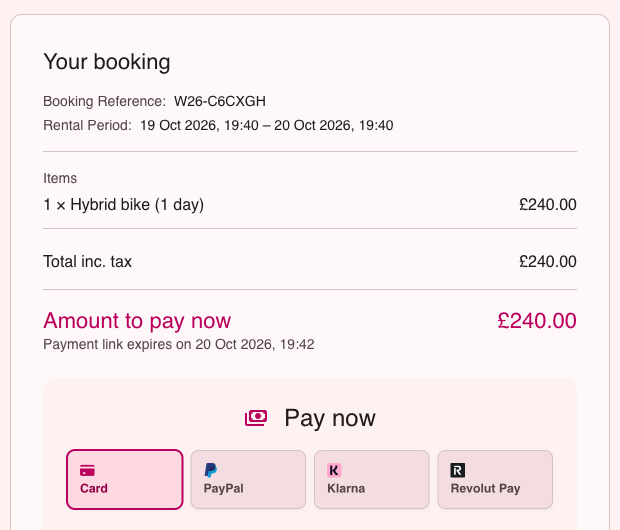
The link opens a payment page on your store's booking site, with no login. It works on a phone. The page shows:
- Your booking: rental start and end times, then everything booked, as at checkout: items and their extras, add-ons, fees, discounts, tax and the total
- Paid so far and Amount to pay now
- When the link expires: "Payment link expires on [date], [time]", then the minutes left in the last hour
- Pay now: the payment form, with card and any other payment methods your Stripe account offers, such as PayPal, Klarna or Revolut Pay
The page never shows the customer's name, email, phone or address, so a forwarded link gives nothing personal away.
Once they pay, the page says Payment received, with the amount and the booking reference. Opening the link again shows Already paid. If their card is declined, the page says "That payment didn't go through. Please try again, or use another card."
What happens in BRM after the customer pays
BRM records the payment on the booking by itself, so there's nothing to match up by hand.
- Transactions tab: the payment shows as a Stripe payment with the card brand and last four digits, and the balance goes down. The payment link card reads Paid, with the date and time.
- Booking stage: a provisional booking moves to confirmed, as it would after an online payment.
- Events tab: "Payment link created for …" and "Payment received through payment link".
- Saved card: the card is saved to the customer, as at online checkout, so you can charge it again later from the booking.
- Your Stripe account: the money goes to your store's Stripe account, like any online payment.
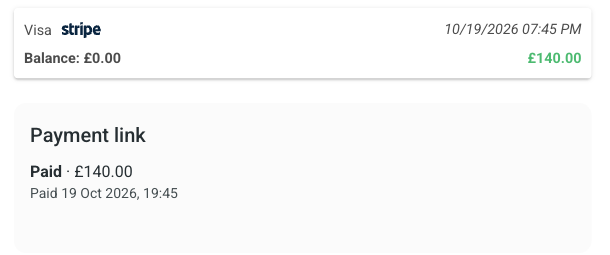
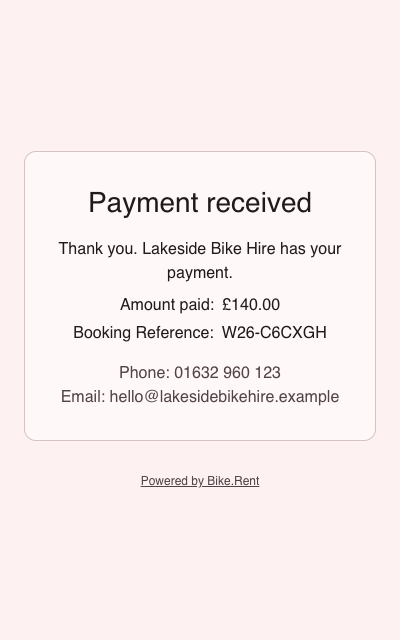
Right after paying, the card may say "A payment on this link is being processed" and the customer's page "Payment in progress". Both update once Stripe confirms the payment.
Why a payment link stops working
A link can only be paid once, and only while it still matches the booking. BRM checks every time the link is opened, and again just before the card is charged.
| What happened | The link card shows | Your customer sees | What to do |
|---|---|---|---|
| The customer paid | Paid, with the date | Already paid | Nothing |
| 24 hours passed | Expired | This link has expired. This payment link can no longer be used. Please contact [your store] for a new one. | Generate new link |
| You made a new link | Cancelled: Replaced by a newer link | This link isn't valid | Send the new link |
| You clicked Cancel link | Cancelled: Cancelled by staff | This link isn't valid | Nothing, or Generate new link |
| The booking was cancelled, by you or automatically | No longer valid: the booking was cancelled | Link no longer valid. This payment link is no longer valid. Please contact [your store]. | None: cancelled bookings can't have a link |
| Less is now owed than the link asks for: a payment taken in the shop, a lower price or a discount | No longer valid: the amount owed changed | Link no longer valid. This payment link is no longer valid. Please contact [your store]. | Generate new link. The amount starts at what's owed now. |
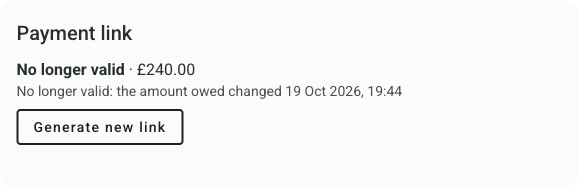
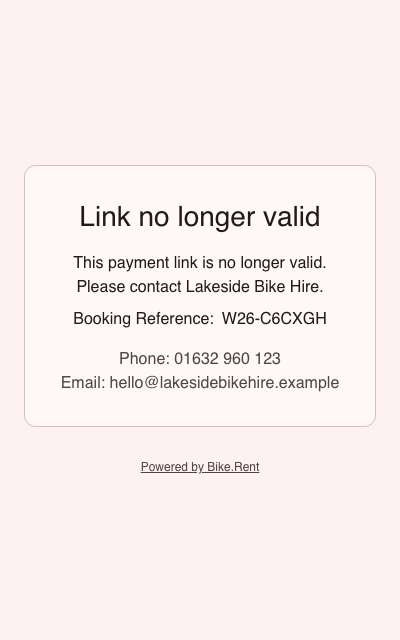
The "no longer valid" page shows the booking reference and your store's phone and email, so the customer can get in touch. If the customer already had the page open, pressing Pay shows that page and no money is taken.
These don't stop a link: a higher price, new dates, added items or notes. The page always shows the booking as it is now, and the customer pays the link's amount. To collect a higher balance in one go, make a new link.
Online bookings that cancel themselves: if your store automatically cancels unpaid provisional bookings made online, a link on one of those bookings stops working when the booking is cancelled, even within its 24 hours. To avoid this, confirm the booking before you send the link. Bookings made in the back office are never cancelled automatically.
Common questions
Does BRM send the link for me?
No. Copy the link and send it yourself, by email, text, WhatsApp or any other way.
Does my customer need an account?
No. They open the link and pay, with no login.
Can I take a deposit now and the rest later?
Yes. Make a link for the deposit. Once it's paid, make another link for the balance.
The price went up after I sent the link. What happens?
The link keeps working for its amount, and the rest stays owed. To collect the full new balance in one payment, make a new link. That cancels the old one.
The customer paid part of it in the shop. Can they still pay the link?
Only while they still owe at least the link's amount. Once they owe less, the link stops by itself. If you don't want the link paid, click Cancel link.
How do I refund a payment made by link?
As for any Stripe payment: refund it from the payment in the booking's Transactions tab.
How long does a payment link last?
24 hours. This can't be changed. Once it expires, generate a new link.
How do customers pay?
By card, or with any other payment method your Stripe account offers, such as PayPal, Klarna or Revolut Pay. The money goes to your store's Stripe account.
Is it safe to send a payment link by text or WhatsApp?
Yes. Each link belongs to one booking and can't be changed to pay another. It shows no personal details and stops working after 24 hours.
Was this article helpful?
That’s Great!
Thank you for your feedback
Sorry! We couldn't be helpful
Thank you for your feedback
Feedback sent
We appreciate your effort and will try to fix the article