You can refund a Stripe payment straight from the reservation. The money goes back to the customer the way they paid, and BRM adds the refund to the reservation's transactions for you.
How to process a refund
- Open the More menu on the Reservation Detail Panel.
- Select Stripe Refunds.
- Pick the payment to refund, enter the amount and, if you want, a note.
- Confirm the refund.

Multiple transactions
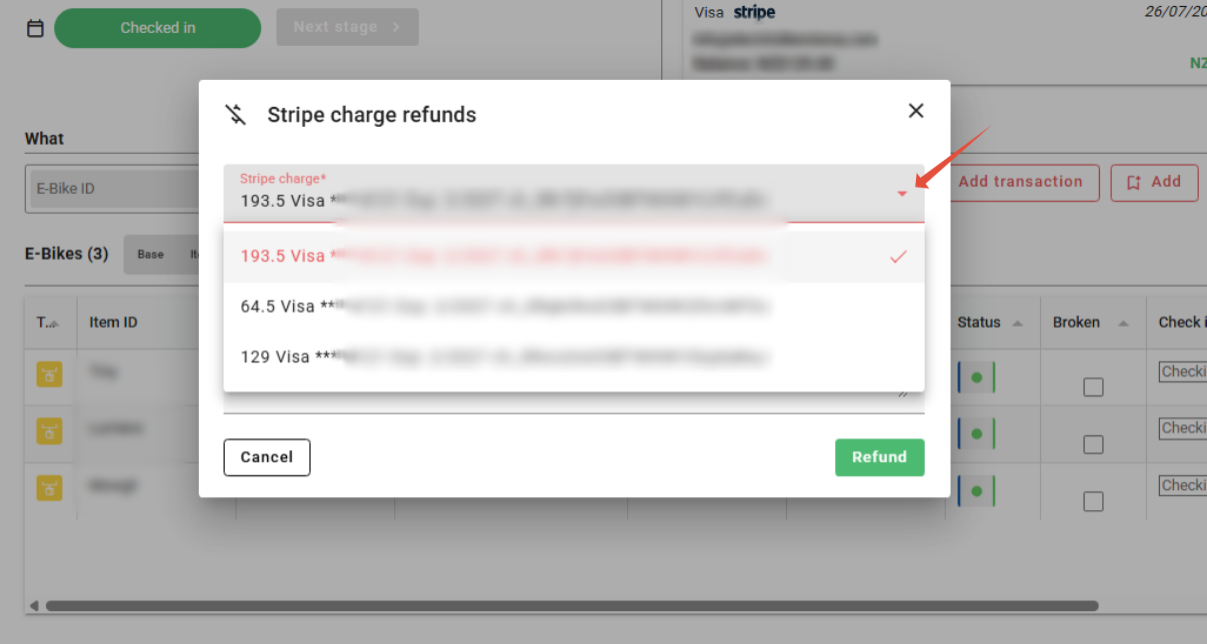
If more than one Stripe payment has been taken for a booking, choose which one to refund. Click the drop-down arrow to see every Stripe payment on the booking. Each one shows its amount and Stripe's payment reference. Card payments also show the card brand, the last 4 digits and the expiry date.
Which payments can be refunded
- Card payments, including Apple Pay and Google Pay. Stripe treats wallet payments as card payments, so they appear in the list as a card and are refunded in the same way.
- Other payment methods your Stripe account accepts, such as iDEAL, Bancontact, SEPA Direct Debit or Klarna. These are refunded in the same way. They don't have a card brand or card number, so use the amount and Stripe's payment reference to pick the right one.
Avoiding a failed refund
- Type the amount as a plain number, using a full stop for decimals, for example 12.50. Don't add a currency sign or a comma (such as $40 or 12,50), or the refund won't go through.
- The amount must be more than zero, and no more than what's left to refund on that payment. If part of a payment has already been refunded, you can only refund the rest.
- A payment that has already been fully refunded can't be refunded again. Check the reservation's transactions first.
- Keep the note under 500 characters.
If you refund in the Stripe Dashboard instead
A refund made directly in your Stripe Dashboard doesn't update BRM. Record it on the reservation yourself as a negative transaction, using the same payment method as the original payment, and put Stripe's refund reference in the notes. See Adding refunds & corrections (negative transactions).
Can't see the payment in the list?
See Why can't I refund a payment when there's no card on file for the customer?.
Was this article helpful?
That’s Great!
Thank you for your feedback
Sorry! We couldn't be helpful
Thank you for your feedback
Feedback sent
We appreciate your effort and will try to fix the article