Who this is for: store staff working a booked repair through to collection. For setting repairs up in the first place, see Setting up Repairs for your store.
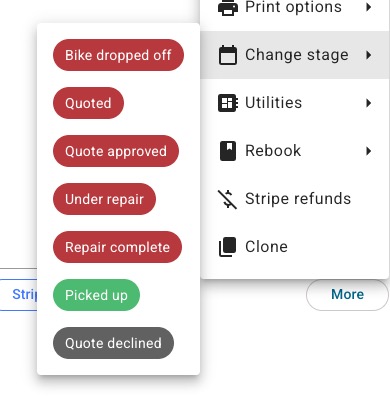
Once a customer books a repair, it arrives in your Back Office like any other reservation — but its stages are tailored to repairs rather than rentals. You drive the job through those stages in the reservation's repair panel, using Next stage or the Change stage menu.
The repair lifecycle
- Bike dropped off — the customer has brought the bike in.
- Quote — your mechanic has looked at the bike and sends a price for the work (see below).
- Quote approved / declined — the customer's answer, or yours on their behalf.
- In repair — work has started.
- Ready to collect — the work is done.
- Picked up — the customer has collected the bike.
Sending a quote
When your mechanic understands the work to be done, use Send quote on the repair panel. You enter the amount and, if you like, an optional comment (for example, "going to need a new wheel, I'm afraid"). BRM then:
- emails the customer the quote — amount and your comment;
- records "Quote issued: £… " on the reservation's Notes tab;
- shows the sent quote on the Comms tab.
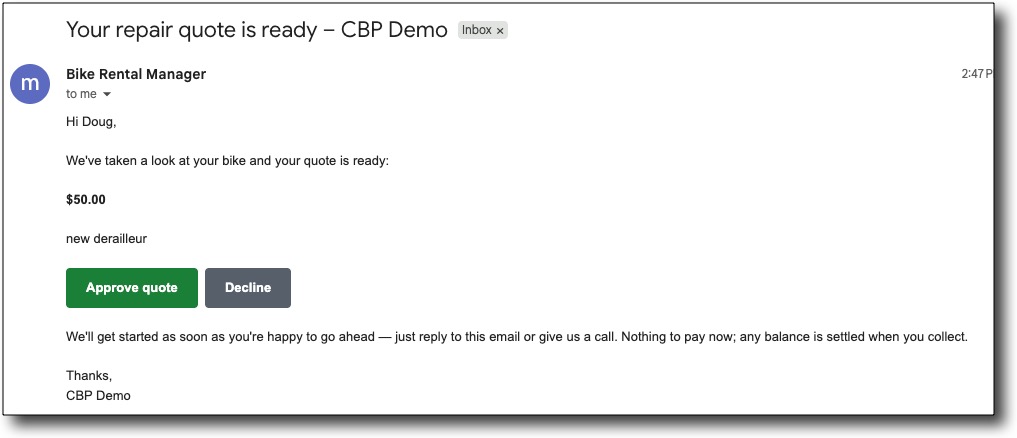
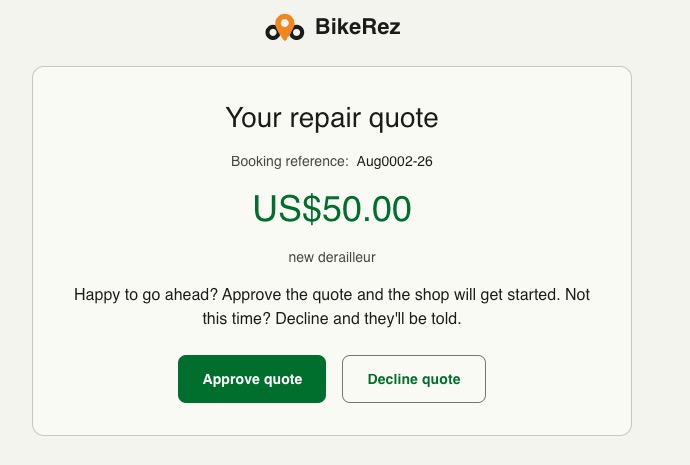
The customer's email carries Approve quote and Decline quote buttons that open a secure page showing the quote. When they answer, the repair updates in BRM instantly — the panel flips to Quote approved (or Declined), and the Events tab records that the customer approved or declined. You also get a notification email, provided your shop notification address is set in Settings > Notifications: Shop notification addresses under Sender details on the new Notifications page, or Booking notification email(s) under Who on the previous pages.
Customer said yes on the phone? You don't have to wait for the email. At the Quote stage, the repair panel's next step is Approve — use it to record the customer's approval yourself, then Start the work.
Approving a quote sets the price charged
This is the important part. When a quote is approved — whether the customer approves it from their email, or you approve it for them — the quoted amount automatically becomes the price charged for the repair. Tax lines, totals and any percentage booking fee are recalculated to match, and the invoice updates too.
So if a bike was booked in at a nominal £50 and you quote £140 for the actual work, once the quote is approved the reservation charges £140, not £50. Any parts or extras you've added stay on top of the approved amount.
Only a genuine approval reprices the reservation. Jumping the stage to "Approved" with the Change stage menu is treated as a correction, not a price agreement, so it does not change the charge. A £0 quote legitimately charges the line at £0 (for goodwill or warranty work). If you re-quote, the newest approval wins.
Finishing the job
Move the repair to Ready to collect when the work is done, and to Picked up once the customer has the bike back.
Why is a day still "full" after I've finished those repairs? A drop-off day counts the work taken in that day, so it stays at capacity for the whole day even once those repairs are completed and collected. Finishing early doesn't re-open the day — this is deliberate, so you're never handed more drop-offs than your workshop planned for.
Related articles
Was this article helpful?
That’s Great!
Thank you for your feedback
Sorry! We couldn't be helpful
Thank you for your feedback
Feedback sent
We appreciate your effort and will try to fix the article